
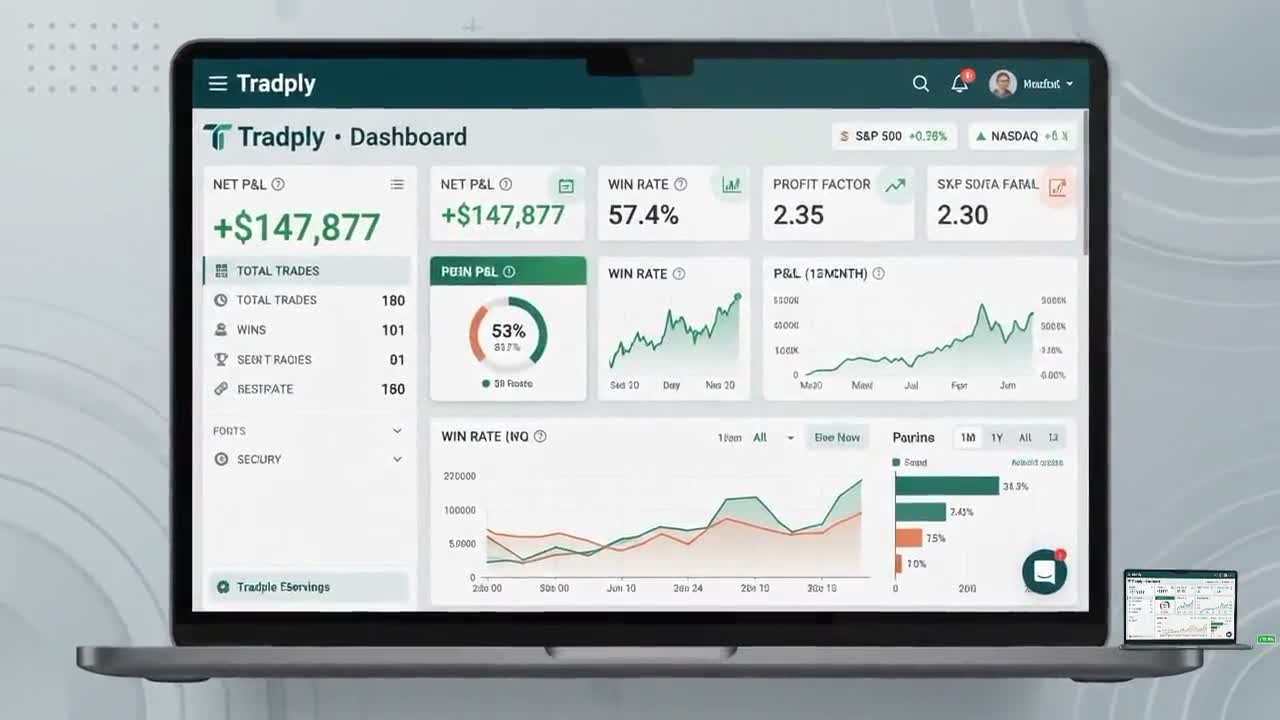
Google Sheets trade journal
Trade smarter. Journal better.
Tradply turns every trade you log into a clean, visual performance dashboard — net P&L, win rate, profit factor and expectancy, updated automatically inside Google Sheets.
Pay once — no subscription · Set up in under five minutes
What you get
Everything the journal works out for you
Log a trade in the sheet. Tradply does the maths, refreshes the charts and keeps your record straight.
-
A dashboard that does the maths
Net P&L, balance, win rate, profit factor and trade expectancy recalculate as you log. Filter the whole dashboard by account and by date range.
-
The numbers most journals skip
Every closed trade gets an R-multiple, a risk-reward ratio, a hold duration and a P&L percentage — worked out from the prices you already entered.
-
Split by strategy and by market
Compare win rate, profit factor, expectancy and average win against average loss for each strategy and each market, instead of one blended number.
-
A profit calendar
Day-by-day and week-by-week results across any month you pick, with weekly and monthly totals worked out for you.
-
A registry you can interrogate
Up to a thousand trades, sorted by any column and filtered by status, account, market or strategy — with running totals underneath.
-
Live market context
A watchlist that pulls current price, day change, volume and year-to-date return for indices, crypto and your own tickers, with buy and sell targets beside them.
Inside the journal
This is the actual spreadsheet
No mock-ups. Every panel below is a screenshot of the journal you get, filled with sample trades.
-
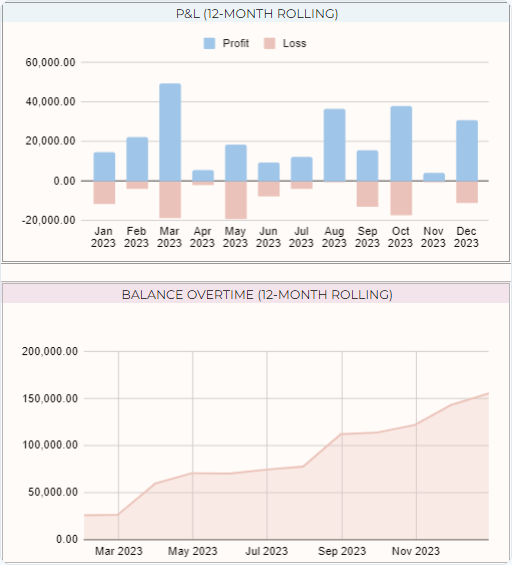
Your year, month by month
A rolling twelve-month profit and loss chart sits above your balance curve, so a strong run and a slow bleed are equally hard to miss.
-
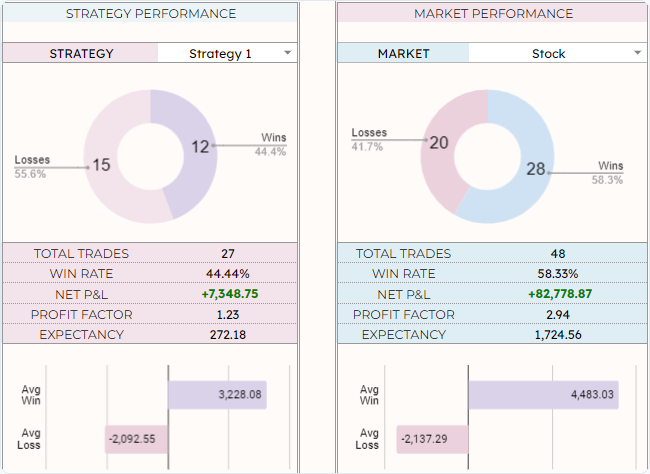
Which edge is actually paying
Compare win rate, profit factor, expectancy and average win against average loss for each strategy and each market you trade, side by side.
-
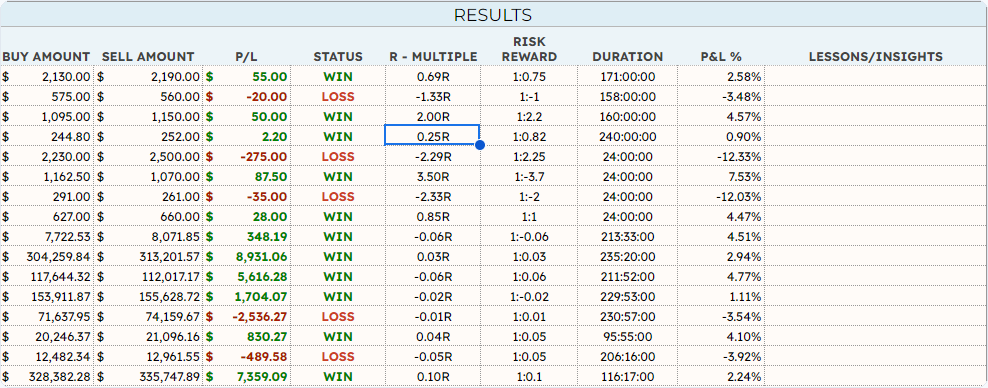
Every trade, fully worked out
Enter your prices and the journal fills in the profit or loss, the R-multiple, the risk-reward ratio, how long you held it and the percentage move. There is a column for what you learned, too.
-
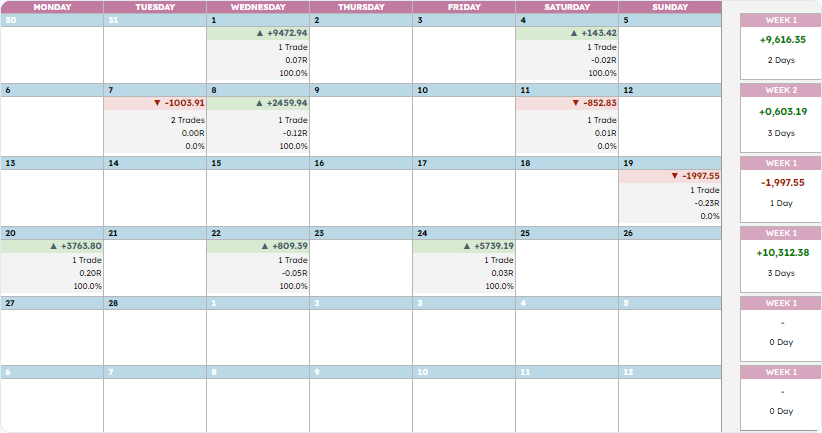
The month at a glance
Daily and weekly results laid out across the calendar, so a recurring bad session stops hiding inside a good month.
-
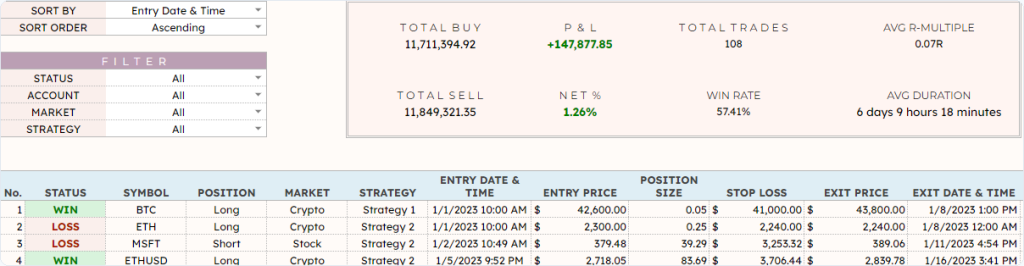
Your whole history, searchable
Sort by any column and filter by status, account, market or strategy, with the totals recalculating underneath as you go.
-
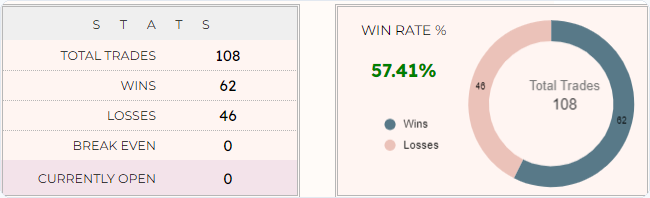
Win rate, counted honestly
Wins, losses, break-even trades and still-open positions are each counted separately — a journal that quietly folds open trades into your win rate is flattering you.
Figures shown are sample data used to demonstrate the layout — not real or projected trading results.
How it works
From checkout to your first logged trade
Three steps, about five minutes.
-
Choose your plan
Pick an access term and pay once. Payment is taken on Stripe's secure page — card details never touch this site.
-
Open your journal
Stripe shows you the link to the Tradply sheet as soon as the payment clears, and emails you a receipt. Make a copy into your own Google Drive.
-
Log your first trade
Fill one row. The dashboard, charts and stats update themselves from there.
Why Tradply
A journal you will actually keep
No new app to learn, no account to babysit. It is a spreadsheet — in your own Google Drive, under your control.
-
Your data never leaves your Drive
The journal is copied into your own Google account. We cannot read your trades, your positions or your P&L — we have no access to the file at all.
-
Pay once, and that is it
You buy an access term, not a subscription. Nothing renews, no card sits on file waiting, and there is nothing to remember to cancel.
-
Nothing new to learn
If you have ever used a spreadsheet, you already know how to use this. It opens in a browser or in the Google Sheets app on your phone — no onboarding, no tutorials, no dashboard tour.
-
Built for more than one account
Track up to thirty accounts, thirty markets and thirty strategies side by side, in the currency you actually trade, then filter the dashboard down to any one of them.
-
Updates for your whole term
Improvements we ship while your access term runs are yours at no extra cost.
-
A person answers the email
Write to support and a human replies — usually the same working day, and never a chatbot.
Pricing
One payment. Choose your access term.
Every plan unlocks the same complete journal and dashboard. Longer terms simply cost less per month.
-
1 Month
$16.00 one-time
+ VAT / sales tax where it applies
Get startedA single month of full journal and dashboard access. Good for trying the workflow on real trades.
-
3 Months
$27.00 one-time
+ VAT / sales tax where it applies
Works out at $9.00 per month
Save 44% versus monthly
Get startedA full quarter — long enough to build a habit and see a pattern in your results.
-
6 Months
$40.00 one-time
+ VAT / sales tax where it applies
Works out at $6.67 per month
Save 58% versus monthly
Get startedHalf a year of records, so your win rate and profit factor start meaning something.
-
Most popular
12 Months
$60.00 one-time
+ VAT / sales tax where it applies
Works out at $5.00 per month
Save 69% versus monthly
Get startedA complete year of trading history, month-by-month P&L, and every update we ship.
-
Best value
24 Months
$107.00 one-time
+ VAT / sales tax where it applies
Works out at $4.46 per month
Save 72% versus monthly
Get startedTwo years at the lowest monthly rate we offer. For traders who journal for the long run.
Every plan includes
- Performance dashboard with account and date filters
- Net P&L, win rate, profit factor and expectancy
- R-multiple, risk-reward, duration and P&L % per trade
- Strategy and market performance breakdowns
- 1,000-row trade log and sortable registry
- Monthly profit calendar with weekly totals
- Live watchlist with buy and sell targets
- Up to 30 accounts, markets and strategies
- Free updates for your whole access term
Prices are in USD and exclude tax. Stripe works out any VAT or sales tax due for your country at checkout and adds it to the total, so the amount you pay can be higher than the price shown. This is a one-time payment for the access term shown — not a recurring subscription, and nothing renews automatically.



Secure checkout via Stripe · 14-day refund policy · Cancel any time, nothing auto-renews
FAQ
Questions, answered
Still unsure about something? Email us and we will answer before you buy.
Is this a subscription?
No. You pay once for an access term — 1, 3, 6, 12 or 24 months. Nothing renews automatically, no card is kept on file, and there is nothing to cancel.
What exactly do I get for my money?
A Google Sheets workbook with six working tabs: a setup sheet for your accounts, markets and strategies; a live watchlist; a trade log; a performance dashboard; a sortable trade registry; and a profit calendar. Plus an instructions tab, and any improvements we ship during your access term.
How do I get it after I pay?
Card and wallet payments confirm in seconds, so {{delivery_route}}. Bank debits (ACH, SEPA) take a few business days to clear, and your link is sent the moment the payment confirms. Open it, choose File → Make a copy, and the journal is saved to your own Google Drive.
Do I need a Google account?
Yes — a free one is enough. Tradply is built in Google Sheets, so you need a Google account to copy and open it. You do not need Google Workspace or any paid plan.
Can I track more than one account?
Yes. You can set up to thirty accounts with their own starting balances, thirty markets and thirty strategies, and pick the currency everything is reported in. The dashboard and the registry can then be filtered down to any single account.
How many trades can I log?
A thousand rows in the trade log, and the registry reads the lot. That is several years of trading for most people. If you fill it, make a fresh copy for the next period — your old one stays exactly as it is.
Which markets and instruments does it work with?
Any of them. Stocks, crypto, forex and metals are set up out of the box, and you can rename or add your own categories. You enter the trades, so the maths works the same whatever you traded.
What are R-multiple and expectancy?
R-multiple expresses a result as a multiple of the risk you took — a trade that made twice what you had at risk is +2R. Expectancy is the average amount a trade returns you over time. Both are calculated automatically from the entry, stop and exit prices you enter; you do not have to work anything out yourself.
Do the market prices update on their own?
On the watchlist, yes. It pulls live price, day change, volume and year-to-date return for indices, crypto and any ticker you add, using Google Sheets’ built-in market data. Your own trades are always entered by you — nothing connects to your broker.
Can I use it on my phone?
Yes, through the Google Sheets app on iOS or Android. Logging trades on a phone works well; the wider dashboard and calendar are easier to read on a larger screen.
Can you see my trading data?
No. The copy lives in your Google Drive under your account. We have no access to it and receive nothing from it. We could not read your trades if we wanted to.
Does it connect to my broker?
No. Trades are entered by hand, which is deliberate — writing the trade down is most of the point of keeping a journal. It also means there is no broker login to hand over and nothing for us to store.
What happens when my access term ends?
Your spreadsheet stays exactly where it is, with all your data, and keeps working. What ends is access to new updates. Buy another term whenever you want to pick those up again.
Can I get a refund?
Yes. Email us within the refund window and we will refund you without an interrogation. The full terms are in our Refund Policy.
Is any of this financial advice?
No. Tradply is a record-keeping and educational tool. It does not give signals, recommendations or forecasts — it reports on trades you have already made. Trading involves substantial risk of loss, and past performance is not indicative of future results.
How do I pay?
By card, Apple Pay, Google Pay, Link, Klarna, or bank debit (ACH and SEPA) — whichever Stripe offers in your country. Payment details are entered on Stripe’s own secure fields and never reach this website; we never see or store your card number.
Do I pay VAT or sales tax?
The prices on this site exclude tax. At checkout Stripe works out whether VAT or sales tax applies where you are and adds it to the total, so the final amount can be higher than the listed price. You always see the full total before you confirm payment.
I have a question that is not here.
Email support@tradply.com. We answer every message, usually within one business day — and we would rather answer before you buy than after.
Start keeping a record worth reading
Pick an access term, pay once, and log your first trade today.
Questions before you buy?
We reply to every message, typically within 1 business day.